How to send an email verification code
An email verification code is commonly used to confirm that a user has access to a specific email address during account creation, login, or profile updates. By sending a one-time code to the user’s inbox, businesses can validate email ownership before enabling access to services or completing sensitive actions. This approach is widely used across digital platforms to support structured user verification workflows.
What is an email verification code?
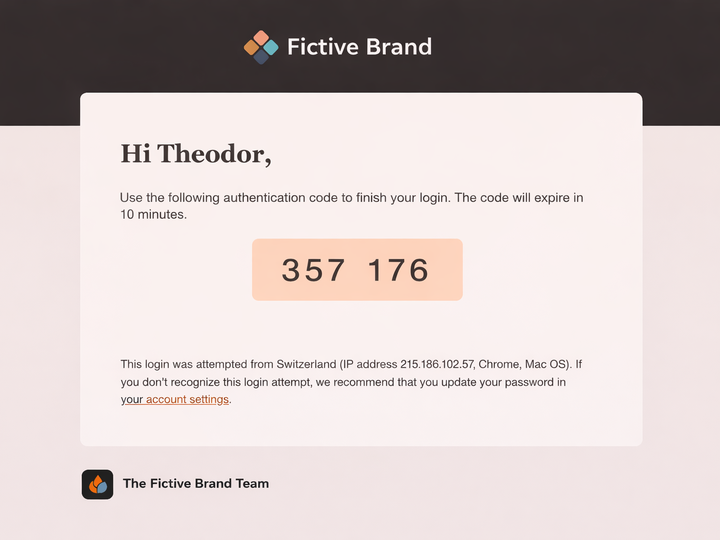
An email verification code is a temporary numeric or alphanumeric code generated by a system and sent to a user’s email address. The user enters the code within a defined time window to complete a verification step.
Typical use cases include:
New account registration
Email address confirmation
Password reset processes
Login verification and step-up authentication
The code itself is the verification factor, while email is the delivery channel.
How email verification codes support business processes
From a business perspective, email verification codes help ensure that user accounts are linked to valid and accessible email addresses. This supports accurate customer data and more reliable ongoing communication.
Email is widely used for transactional messaging and fits well into verification flows.
Common characteristics of email verification codes
Short validity period
Single-use by design
Automatically generated by backend systems
Sent immediately after a user-triggered action
These characteristics make email verification codes suitable for automated and scalable verification processes.
Delivering an email verification code using an email API
To work effectively, an email verification code must be delivered consistently and without delay. This is typically handled through an email API, which allows systems to trigger transactional emails directly from applications or platforms.
An email API enables businesses to:
Trigger verification emails automatically
Insert the verification code dynamically into the message
Control sender identity and message structure
Monitor delivery and system responses
API-based delivery supports higher volumes and integrates directly into authentication and onboarding systems.
Using MyLINK Email API to trigger email verification codes
MyLINK Email API is designed for fast, safe, and reliable delivery of transactional emails, including messages that contain an email verification code. The verification code itself is generated by the business’s own system or authentication logic, while the API is used to trigger and deliver the email at the required moment.
This separation ensures that security logic remains within the business application, while email delivery is handled through a dedicated transactional messaging interface.
With MyLINK Email API, organizations can:
Insert email verification code into the email content
Trigger email delivery in real time as part of registration, login, or account update flows
Use consistent sender configurations across applications and markets
Support high-volume verification messaging through automated delivery
The email verification code remains the security element defined by the business system, while MyLINK Email API provides dependable delivery of the message containing the code.
Typical verification flow using email
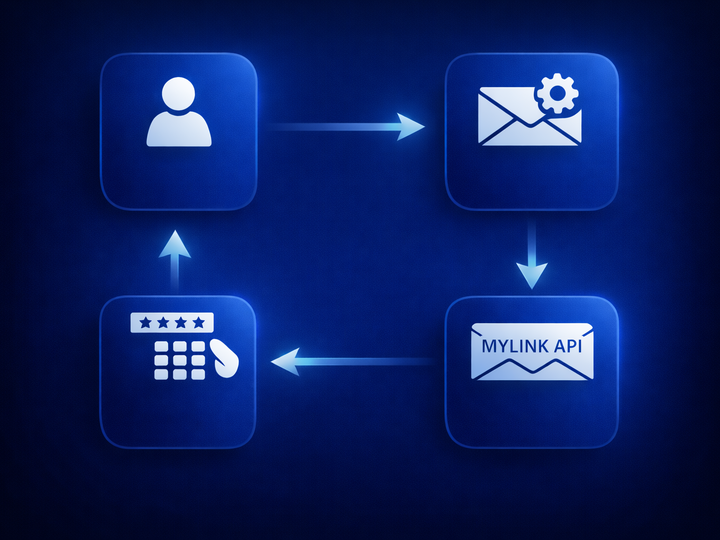
In most verification scenarios, the email verification code is integrated into an automated process that connects user actions with backend authentication systems and transactional email delivery.
A user initiates an action that requires verification
The business system generates a unique email verification code
MyLINK Email API is triggered to send the email containing the code
The user enters the code to complete the verification step
This flow supports automated verification across web and mobile platforms and can be adapted to different account and access scenarios.
Email verification code or SMS verification code?
Email verification codes are often used alongside SMS verification codes. The choice between email and SMS depends on the urgency of the action and the context of the user interaction.
Email supports structured verification flows where delivery reliability and message clarity are important, while SMS is commonly selected when speed and immediacy are the primary requirements.
In many systems, both channels are available, allowing businesses to select the most appropriate option based on the specific use case and urgency.
Email verification codes in multichannel verification setups
Email verification codes are often implemented as part of a broader transactional messaging setup that includes both email and SMS. In these environments, verification logic is handled by the business system, while delivery is managed through channel-specific APIs.
A multichannel approach allows organizations to adapt verification flows based on user context, device, or timing requirements without changing the underlying verification process.
Common multichannel verification patterns include:
Defaulting to email verification for account registration and updates
Using SMS verification for time-sensitive login actions
Offering fallback delivery if the primary channel is unavailable
Maintaining consistent verification logic across channels
By combining email and SMS within the same verification architecture, businesses can support flexible authentication workflows while keeping delivery aligned with each use case.
Email verification code as a standard verification method
The email verification code remains a widely used method for confirming email ownership and supporting user verification across digital services. It provides a clear and repeatable verification step that can be integrated into account creation, authentication, and account management processes.
Delivery of the verification message is typically handled through an email API or an SMS API, depending on the context of the interaction. An email API supports reliable delivery for verification steps tied to account setup and ongoing communication, while an SMS API is commonly used for scenarios where faster user response is required.
By using both Email API and SMS API within the same verification setup, businesses can apply consistent verification logic while selecting the most appropriate delivery channel based on urgency, user behavior, and platform requirements.
Did you find the article and topic interesting?
If you would like to explore the subject further, discuss ideas, or understand how it could apply to your business, we are here to continue the conversation.